
Perform database migration
This document provides some migration strategies that can be adopted in large-scale, production environments.
Charmed Kratos and Hydra in the Identity Platform Juju Bundle use Charmed PostgreSQL as the data backend. Since upstream Ory Kratos/Hydra introduce SQL migrations between releases it is important to perform the right steps to avoid service interruptions.
Some facts and reminders
Charm releases may contain the new version of the corresponding Ory open source product. This means each Charm release will probably require you to do migration. You should refer to the Charm releases (e.g. Kratos releases) and the Ory product release changelogs (e.g. Ory Kratos CHANGELOG.md) to check whether a migration is needed.
The upstream Ory products provide CLI to assist with database migrations, however they do not provide further guidelines for migrating database in production environments or large-scale distributed systems.
There is no silver bullet when coming to database migrations. If your case does not fit in any strategies described in this document please feel free to reach out on Charmhub or our public Matrix channel.
Database migration strategies
Note
This guide has been developed using Kratos as an example. The migration strategy for the Hydra Charm generally follows the same process.
Recommended Strategy
This migration strategy falls into concepts of redundancy (e.g. blue/green deployments) and traffic switchover.
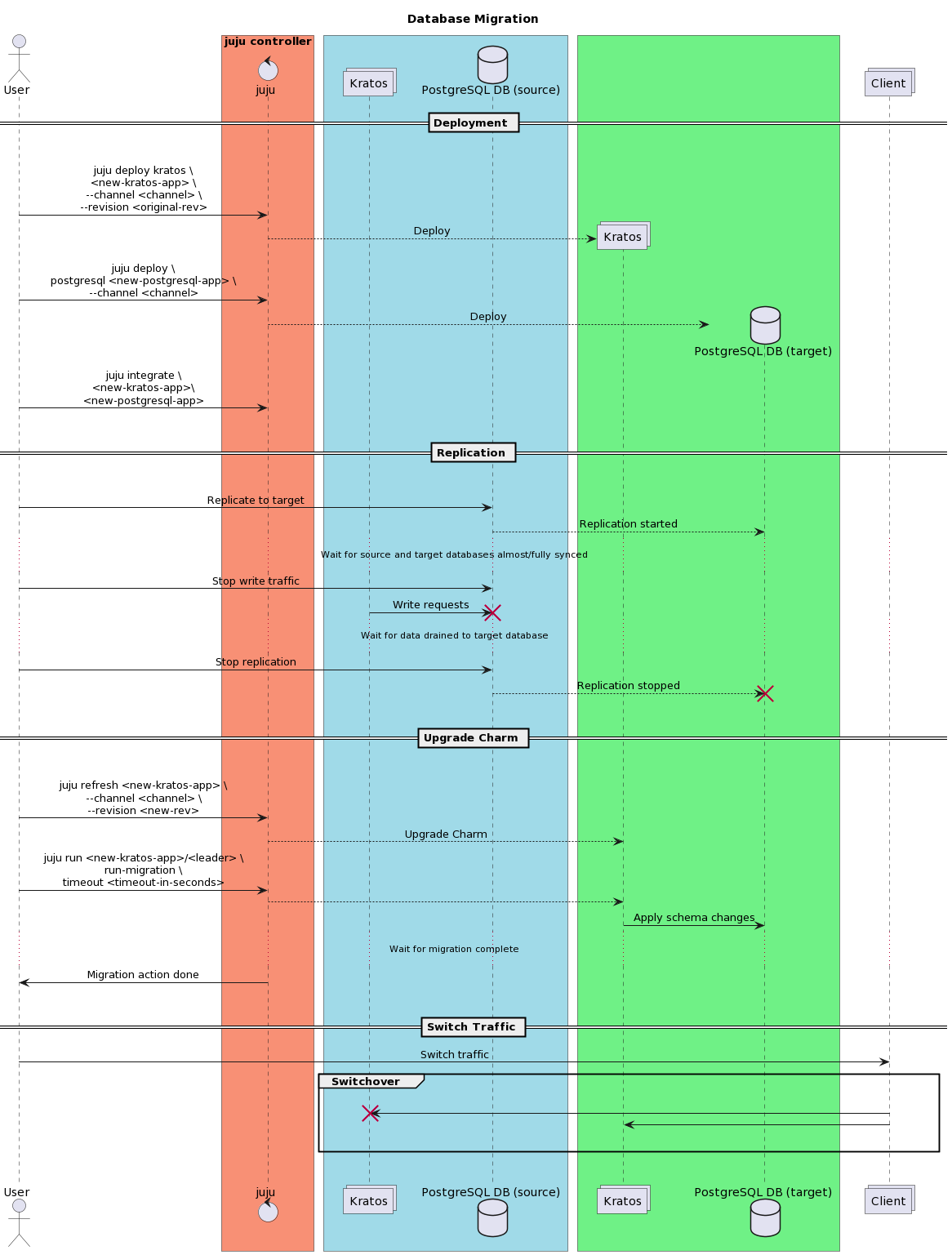
Prepare and deploy a new Kratos Charm of the SAME VERSION as the one you are currently using and a PostgreSQL Charm. Integrate the two Charms.
juju deploy kratos <new-kratos-app> --channel <channel> --revision <original-rev>
juju deploy postgresql <new-postgresql-app> --channel <channel>
juju integrate <new-kratos-app> <new-postgresql-app>
Use database migration systems or database replication mechanisms to sync source database to target database. Wait for the target database is almost/fully synchronized with the source database.
Stop writing traffic to the source database. Wait for all remaining data to drain to the target database. The source and target databases are now fully synchronized.
Upgrade the new Kratos Charm.
juju refresh <new-kratos-app> --channel <channel> --revision <new-rev>
Trigger the migration action. Note: depending on the data size, you may want to use a large timeout threshold.
juju run <new-kratos-app>/<leader> run-migration timeout=<timeout-in-seconds>
Once migration is completed, switch over the traffic to the new Kratos Charm.
The following diagram further illustrates the process:
Attention
Migration strategies can vary significantly in different use cases due to SLA/SLOs, migration downtime tolerances, overall deployment architectures, traffic volumes and patterns, etc. You may want to develop and maintain a migration strategy tailored for your use cases.
You can select the most convenient migration systems/tools to use.
Replication strategies between two PostgreSQL Charms will be provided in the relevant Charmhub topic pages.
Basic Strategy (non-critical environments)
Warning
CAUTION: this method updates the database schemas in-place. Please consider it for a non-production environment and apply it with discretion.
Upgrade the Charm by running the following command:
juju refresh <kratos-app> --channel <channel> --revision <revision>
With the Charm upgraded, you can trigger the migration action by running:
juju run <kratos-app>/<leader> run-migration timeout=<timeout in seconds>
You can check the status of the action by running:
juju show-task <task-id>
Kratos identity schema upgrade
You may want to initiate an update for an identity schema used in the Kratos Charm. In this case, please refer to the best practices to plan the migration.
Migration best Practices
Albeit not specific to the Identity platform, it is important to consider the following points when performing database migrations:
Inspect and understand the system traffic patterns. In general, web application live traffic shows a tidal pattern. Plan ahead and perform the migration plans during the traffic low peak time.
Prepare a fallback/rollback strategy when the migration plan fails.
Prepare a testing/staging environment which resembles the production environment to simulate the migration and fallback/rollback strategies before moving forward to production.
Perform database backups at the critical points of migration plan, e.g. before migration starts, after draining the source database, etc. The PostgreSQL Charm also supports backup and restore operations.
Perform database backups using the replicas instead of primary. If possible, add a new replica specifically responsible for backup jobs.
Perform database completeness and consistency validations after the migration.
Depending on your operational / resiliency requirements you could follow the database per service pattern by amending the Identity Platform bundle configuration.