
Getting started with Charmed Authentik
Welcome to Charmed Authentik! This tutorial provides a guided, learning-oriented path to provision a complete Charmed Authentik solution stack from scratch.
To simplify deployment and establish an infrastructure-as-code baseline, we leverage the pre-configured Terraform scenario located within the operator repository: terraform/solution/examples/tutorial.
What this tutorial deploys
Rather than deploying a flat single-model cluster, this scenario automates a multi-model topology separating core shared services from identity applications:
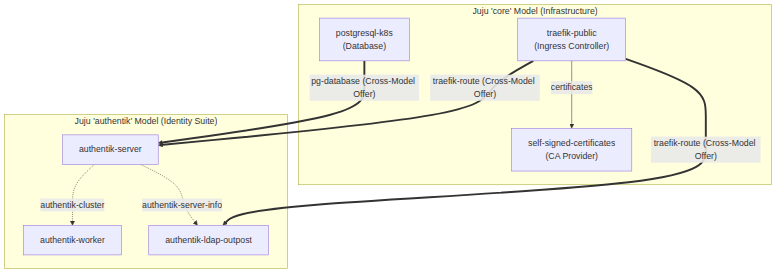
Juju Models: Automates the creation of two isolated models:
core(for shared ingress, database, and certificate authority) andauthentik(for the Authentik suite).Database: Deploys a single-unit Charmed PostgreSQL (
postgresql-k8s) with cross-model integration.Ingress: Deploys Charmed Traefik Route (
traefik-k8s) under the application nametraefik-publicto publish web and directory interfaces.TLS Certificates: Deploys Charmed Self-Signed Certificates (
self-signed-certificates) to secure Traefik’s routing layer.Authentik Suite: Provisions single-unit deployments of
authentik-server,authentik-worker, andauthentik-ldap-outpostoperator charms, linking them together. The worker receives its database credentials and encryption keys over theauthentik-clusterrelation with the server.
Prerequisites
Before beginning, ensure your environment meets the following baseline:
Git and Terraform CLI >= 1.6 installed locally (with the Juju provider constraint >= 1.0). No custom input variables are required; all variables default to
{}.A running Kubernetes cluster (e.g., MicroK8s, Charmed Kubernetes).
A Juju Controller bootstrapped on your cluster.
Juju CLI and
kubectlconfigured to access your cluster.
Quick start guide
Step 1: Clone repository and initialize Terraform
Clone the server operator repository and navigate to the tutorial directory:
git clone https://github.com/canonical/authentik-server-operator.git
cd authentik-server-operator/terraform/solution/examples/tutorial
terraform init
Step 2: Orchestrate and deploy the stack
Deploy the cross-model infrastructure with a single command. Terraform will create the Juju models, fetch the charms, and establish cross-model offers and integrations:
terraform apply -auto-approve
Step 3: Monitor deployment settlement
The Juju controller will begin provisioning the Kubernetes pods. You can watch the real-time status of both models:
# Monitor core shared services (DB, Ingress, Certs)
watch -c juju status -m core --color

# Monitor identity applications (Server, Worker, LDAP Outpost)
watch -c juju status -m authentik --color
A settled and operational stack will report active and idle across all units.
Retrieving admin credentials
During the initial database migration, Charmed Authentik automatically provisions the default administrator account (akadmin) with a strong, randomly generated bootstrap password and API token.
To retrieve these credentials, run the get-bootstrap-admin-credentials action on the leader unit in the authentik model:
juju run -m authentik authentik-server/leader get-bootstrap-admin-credentials
The output will contain:
username:akadminpassword: The generated secure administrator passwordbootstrap-token: The initial cluster-wide API tokenwarning: Guidance on credential usage and stale state warnings
Warning
The bootstrap-token returned by this action is a superuser API token that grants full administrative API access. Store these credentials securely.
Accessing the Authentik Web UI
The Authentik admin dashboard is published securely via Traefik.
Locate Traefik’s Ingress Address: Find the external address or IP associated with your Traefik Ingress:
juju status -m core traefik-public
Browse to the Portal: Point your browser to the URL corresponding to your configured domain or Traefik LoadBalancer IP (e.g.,
https://<traefik-ip>/) and log in using your retrieved credentials.
Managing TLS trust for consumer applications
Important
Because this tutorial provisions self-signed SSL certificates, integrated consumer applications (e.g., Grafana) will not trust Authentik’s CA chain by default.
To automatically propagate and trust the CA certificate across your deployment, offer the CA service from the core model and integrate your consumer application over the certificate_transfer interface:
# 1. Offer the CA service from the core model (the model is part of the offer endpoint)
juju offer core.self-signed-certificates:send-ca-cert

# 2. Integrate your consumer app (e.g. grafana-k8s in the 'authentik' model) to trust the CA chain
juju integrate -m authentik <consumer-application>:receive-ca-cert admin/core.self-signed-certificates
Next steps
Now that your Charmed Authentik core is up and running:
Proceed to Protect OIDC and OAuth applications to configure Single Sign-On (SSO).
Proceed to Protect LDAP applications to connect directory services.